Wynncraft brings quests, character progression, and a shared fantasy world into Minecraft. A normal Java Edition client is enough to connect: you do not need a gameplay modpack. Start with the correct address, then let Minecraft load the server's own resource pack.
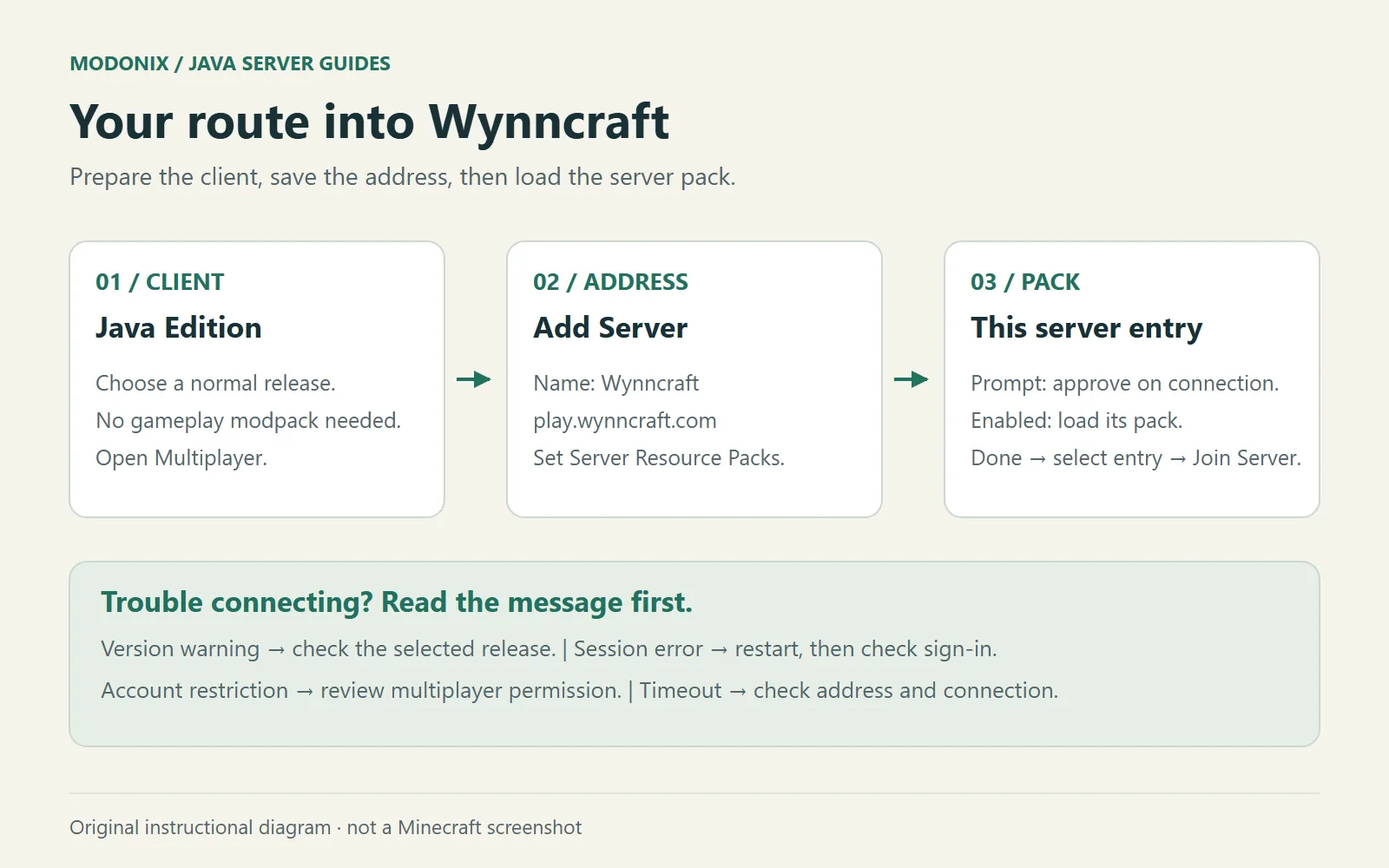
Original instructional diagram: prepare Java Edition, add the Wynncraft address, and allow the resource pack for that server entry.
Choose your Minecraft version
Open Minecraft Launcher and select Minecraft: Java Edition. Use a genuine copy with multiplayer access. Wynncraft's current official FAQ lists Java 1.21.4 and newer and recommends the latest Minecraft version. Choose a normal release for your first visit, rather than a snapshot or an existing modded installation.
You do not need Forge, Fabric, or a third-party “Wynncraft launcher.”
Add the correct server
- Start Java Edition and open Multiplayer.
- Select Add Server.
- Enter Wynncraft as the name. This is your label in the server list.
- Enter
play.wynncraft.comin Server Address, withouthttps://, spaces, or a website path. - For this Wynncraft entry, set Server Resource Packs to Enabled. Alternatively, leave Prompt selected if you prefer to approve the pack when connecting.
- Select Done, choose the entry, and select Join Server when you are ready to play.
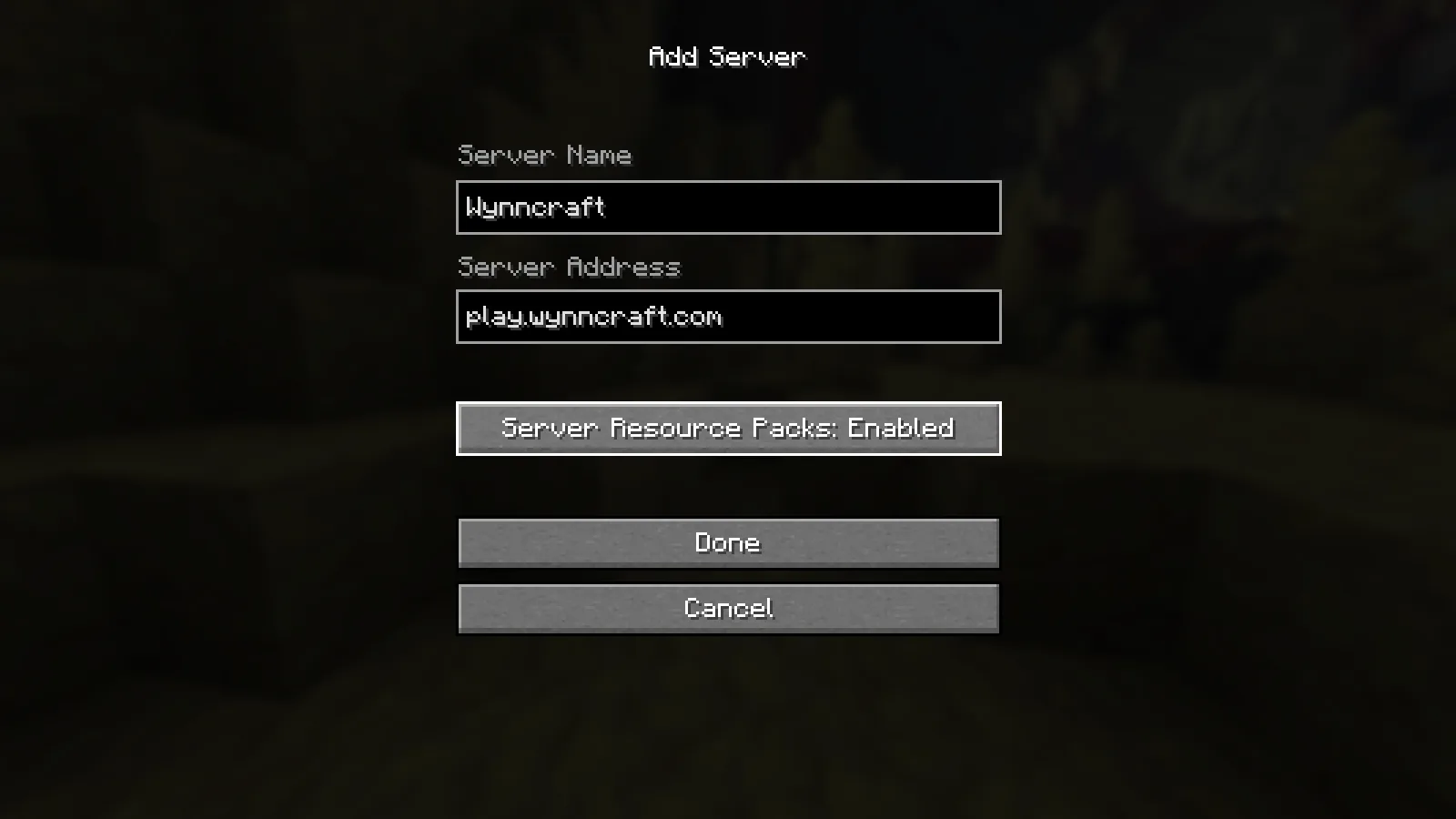
The Java Edition Add Server form with Wynncraft’s address and Server Resource Packs set to Enabled.
You can return through the saved entry on later visits. Wynncraft is accessed through its server; there is no world file to put in your single-player saves.
Load the server's resource pack
The pack supplies Wynncraft's item models and textures. The team's FAQ recommends enabling server packs to receive updates through the connection, rather than keeping an old manual download.
With Prompt selected, read the request from the Wynncraft server you chose and accept its pack to use those visuals. This choice concerns that server entry; it is not a reason to approve packs from unfamiliar servers. Let the download and reload finish before judging missing or unusual item models.
If you previously declined the pack, return to Multiplayer, select Wynncraft, choose Edit, change Server Resource Packs to Prompt or Enabled, and reconnect. You do not need an unofficial pack mirror.
Follow the opening instructions
Read the server's current guidance as you enter its RPG world. Give yourself time to find your current objective and learn the controls it introduces before heading farther afield. If you later add optional client mods, check Wynncraft's rules first; starting unmodified keeps your setup easier to troubleshoot.
Match the problem to the next step
- An outdated-version message: close the game and check the release selected in the launcher against the supported range above. Do not install a random modpack to solve a version mismatch.
- A sign-in or session error: restart Minecraft. If it continues, sign out and back into your Microsoft account through the official launcher, then reopen the game. Wynncraft does not support cracked clients.
- Multiplayer blocked by account settings: for a child account, the adult family organizer needs to review its multiplayer privacy permissions. Changing the server address will not grant that permission.
- A timeout or connection failure: recheck the address, confirm your connection is stable, and pause other large downloads. Keep the exact error and check official server announcements if it persists. A timeout alone does not tell you whether the problem is your connection or the server.
Keep play.wynncraft.com as your destination instead of following an unofficial redirect.
Join the server
Java Edition
Address: play.wynncraft.com · Port: 25565
Accepted versions: Not listed
Check the server entry in Minecraft for current availability.
Comments & questions
Share what worked, ask for help or reply to another player.
No comments yet. Share what worked for you.