Additive: held-torch lighting and visual tools in one Fabric pack

11 views 0 downloads

Shader support, held-torch lighting and resource-pack features prepared together for Fabric.

Additive brings a collection of familiar visual conveniences to a Fabric setup: shader support, held-item lighting, zoom and extra resource-pack features sit alongside its performance-focused foundation. It is useful when you want these pieces prepared together instead of choosing every supporting mod separately.
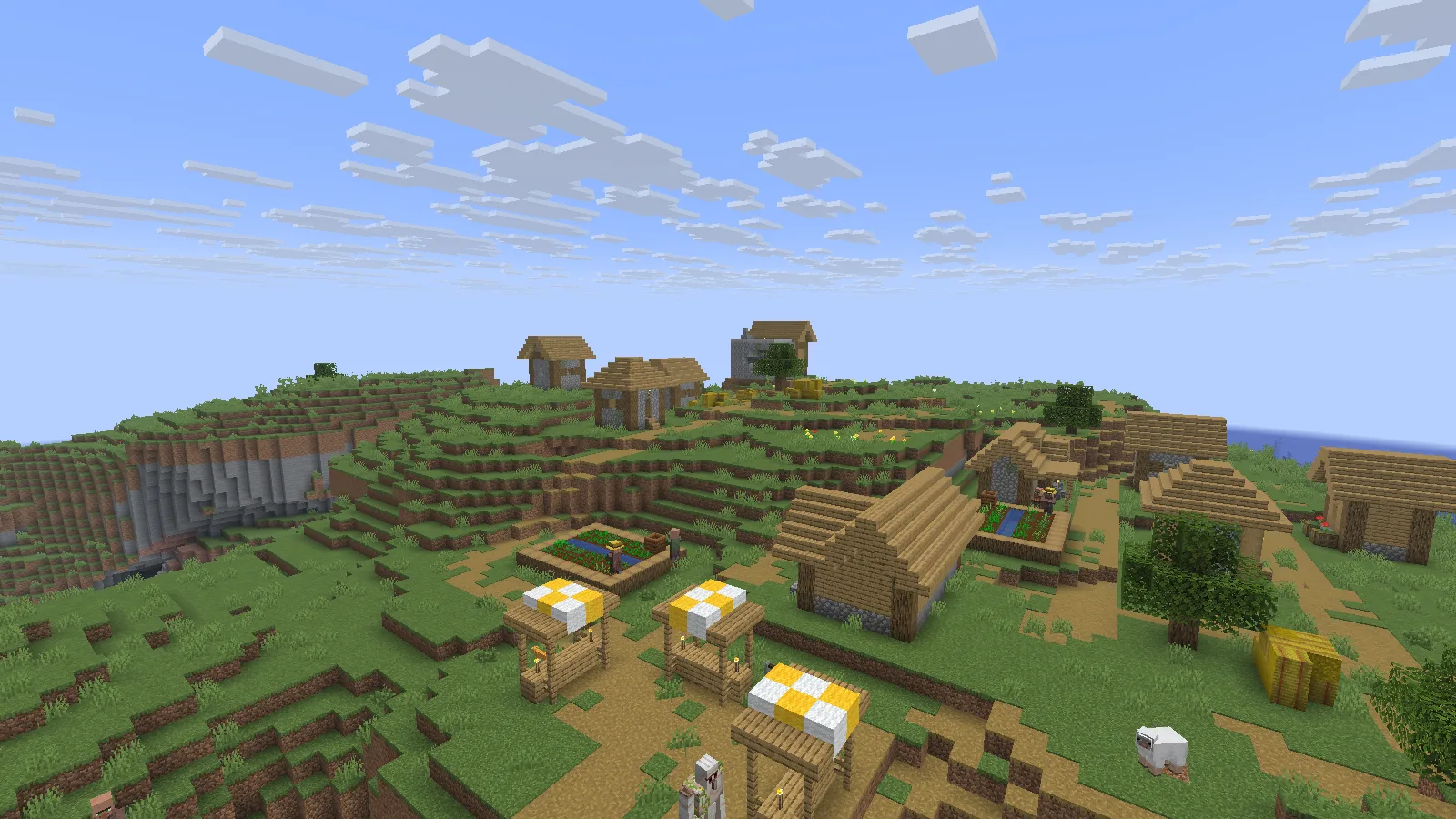
A naturally generated village in Additive 26.5.0, rendered without a shader pack. Photographed in Spectator.

A naturally generated village in Additive 26.5.0, rendered without a shader pack. Photographed in Spectator.

Import into a separate Prism instance

This example uses Additive 26.5.0 for Minecraft Java 26.2, with Fabric.

  1. Download the matching .mrpack from Files on this page. Keep the archive intact.
  2. In Prism Launcher, choose Add Instance → Import, browse to the file and confirm. Name the new instance Additive 26.2 so it is easy to distinguish from your other setups.
  3. Let the launcher download the listed files. Check Edit → Version for the imported Minecraft and Fabric versions; keep them together.
  4. Launch a new world first. For an existing save, use a separate backup copy and keep your original untouched.

The Prism Launcher guide explains the separate-instance workflow.

Compare an empty hand with a held torch

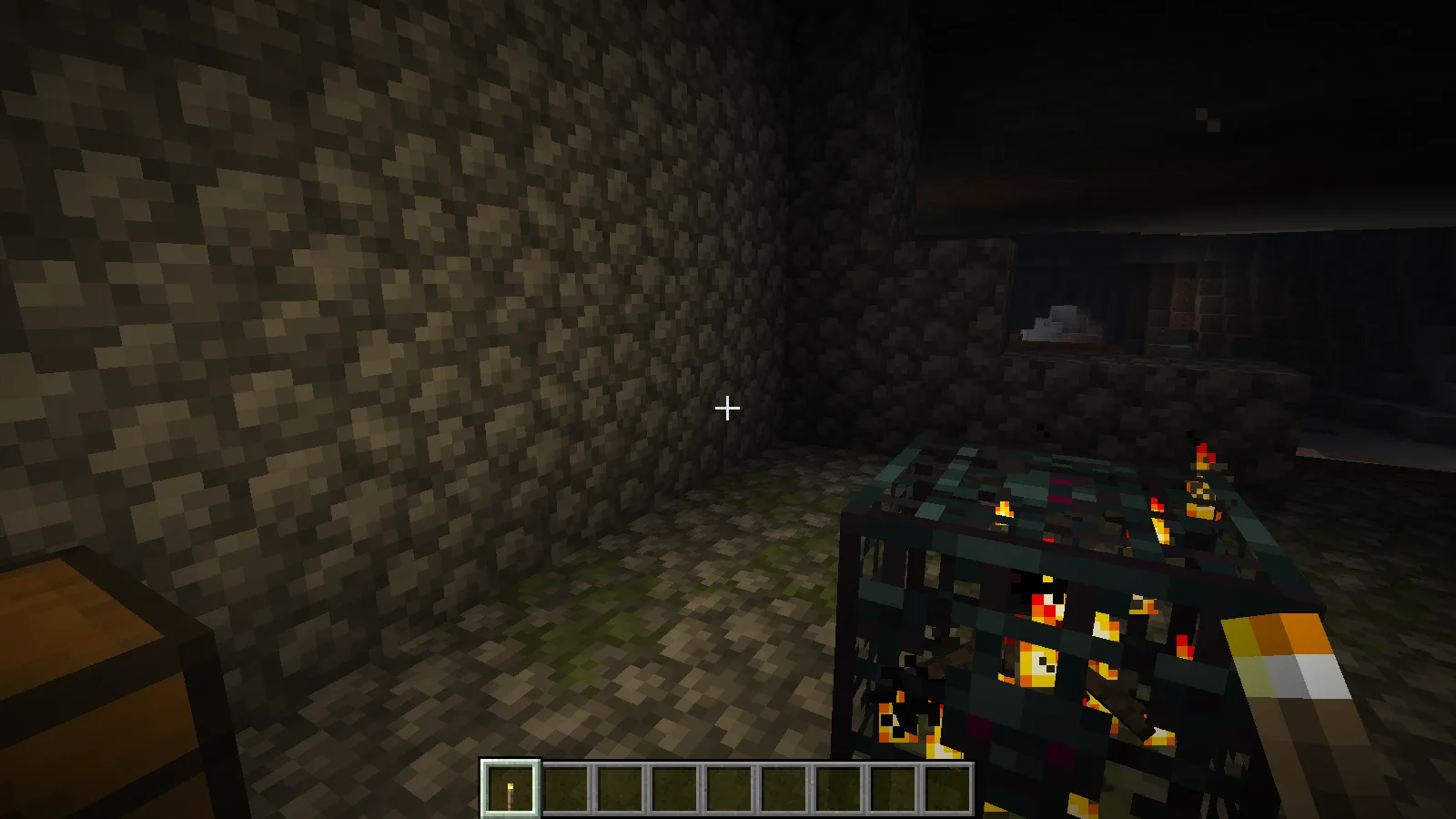
A torch makes a useful first experiment. Put it in your hotbar, enter a dim area and switch between the torch and an empty slot. LambDynamicLights can illuminate nearby surfaces while the torch stays in your hand. Here, a single staged torch makes the natural dungeon wall and floor easier to read from the same camera position.
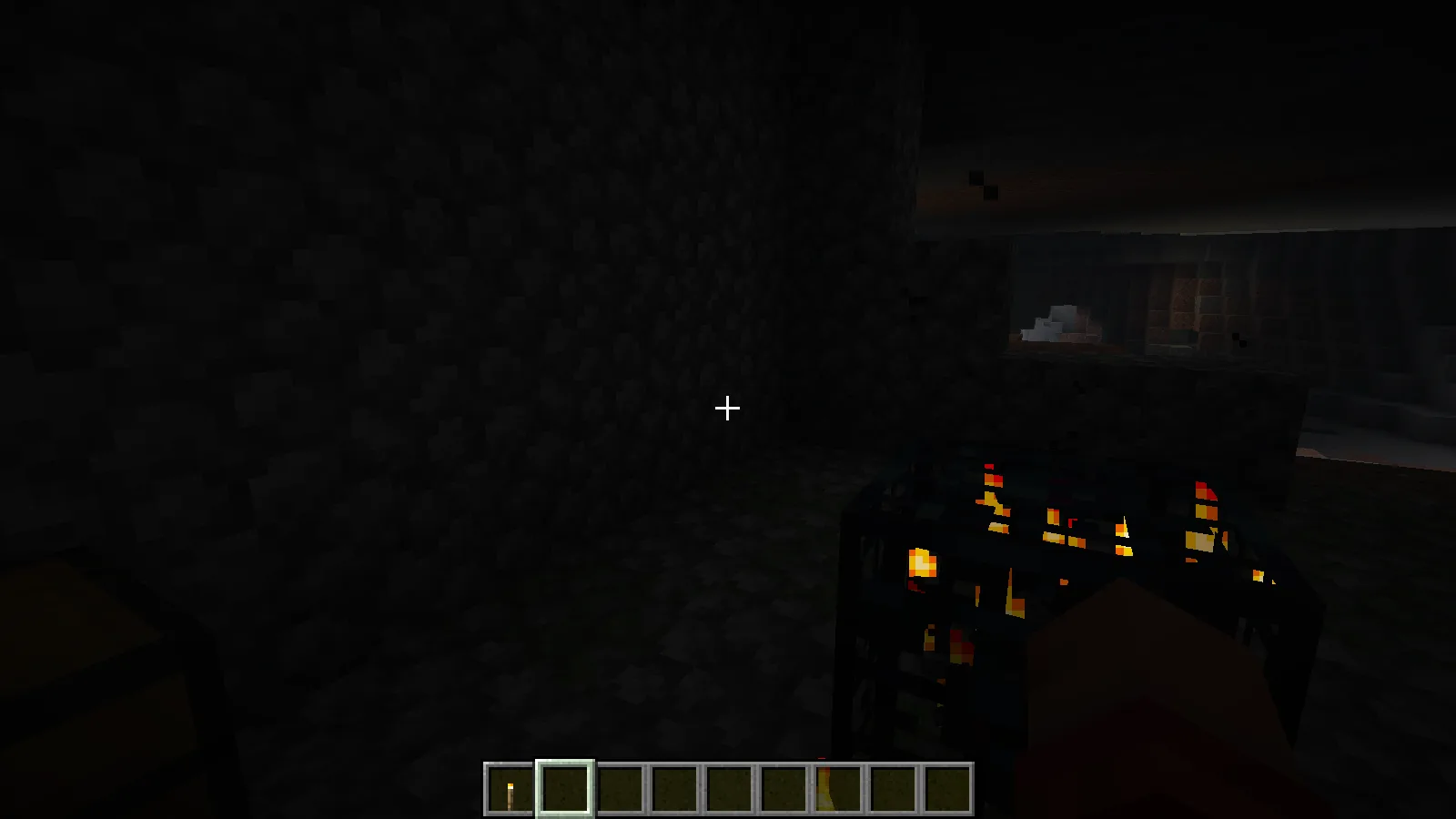
The dungeon wall from a fixed position with an empty hand. Creative demonstration.
The dungeon wall from a fixed position with an empty hand. Creative demonstration.

Holding the staged torch lights the nearby wall and floor through LambDynamicLights.

Holding the staged torch lights the nearby wall and floor through LambDynamicLights.

Add a shader when you are ready

Shader support does not mean that a shader pack is already included. Open Shader Packs to see what Iris can load. Our example starts with an empty list; choose a compatible shader separately when you want a different lighting style. Establish comfortable settings with ordinary rendering before adding a demanding shader.
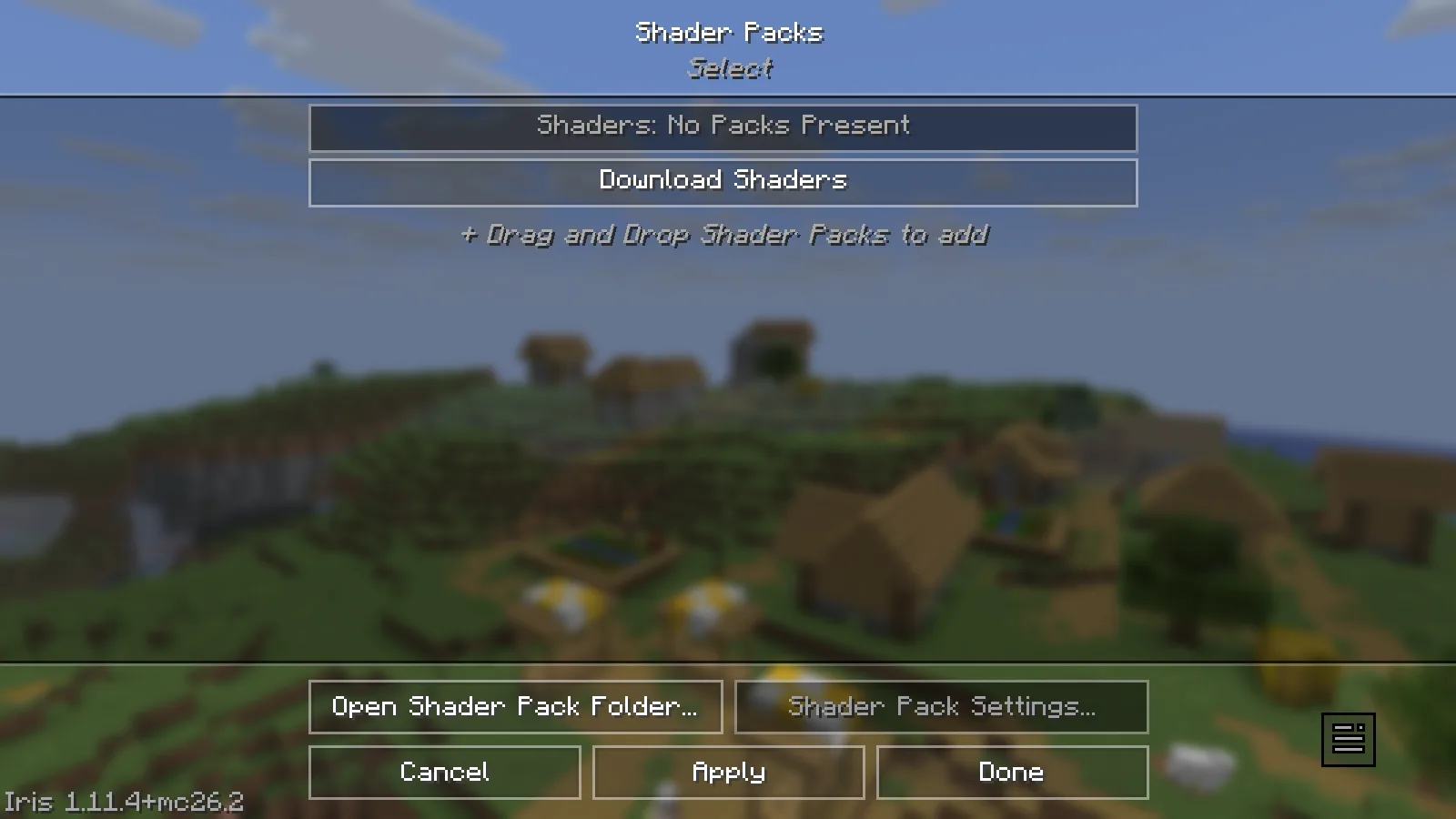
Iris is available; no shader pack has been added in this example.

Iris is available; no shader pack has been added in this example.

Choose optional resource packs deliberately

The supporting mod and your selected resource pack also have distinct jobs. The resource-pack screen offers Default Connected Textures and Glass Pane Culling Fix from Continuity. Move a pack into the selected list and let Minecraft reload it when you want to use it. This screenshot shows those packs available, not activated.
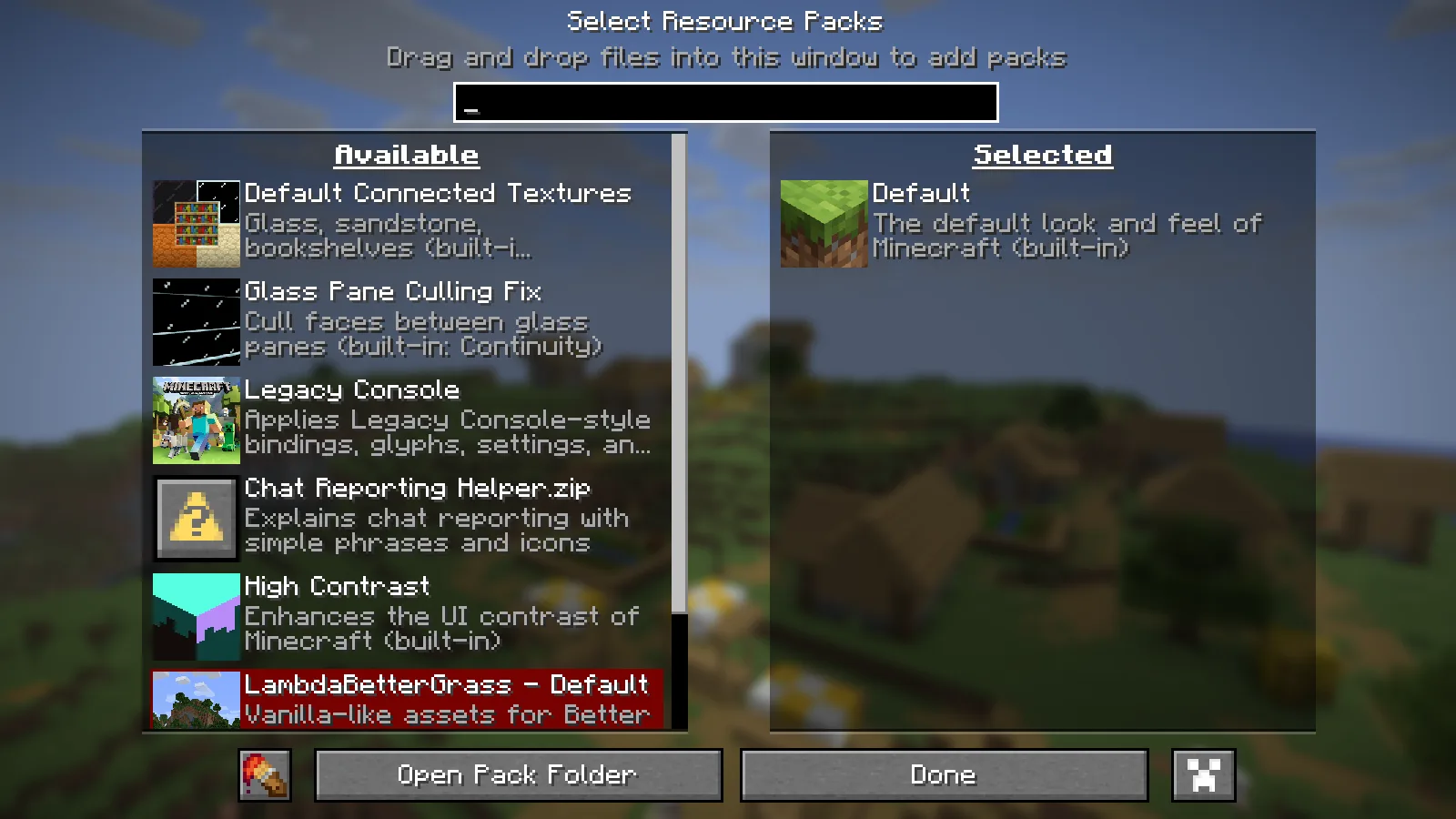
Optional Continuity packs are available; the Default resource pack remains selected.

Optional Continuity packs are available; the Default resource pack remains selected.

Choose Additive for the broader visual toolkit. Adrenaline is the leaner alternative when you only want the performance foundation. A meaningful speed comparison still needs the same world, view and settings on your computer.

No ratings yet

Files

Filter files 1 fileStable
Show all files

Version 26.5.0+mc26.2.fabric

Stable

Additive-26.5.0+mc26.2.fabric.mrpack

Minecraft 26.2 Fabric
0 downloads
Download · 13.8 KB
Requirements & details

Java 26.2 · Fabric · Launcher import

  • Game version: 26.2 · Mod loader: Fabric · Server files: Included in manifest · Distribution format: Modrinth pack (.mrpack)

Download this original .mrpack, then use Prism Launcher: Add Instance → Import and choose the file. Let Prism resolve the manifest and Fabric version. Check Edit → Version for Minecraft 26.2/Fabric, launch a new world first, then use only a backup copy of an existing world.

Requirements & notes
Known issues
No installed shader pack tested; Continuity packs listed but not activated No controller, zoom-key, hosting or FPS benchmark test Creative torch staging is not survival acquisition Private capture options only: pauseOnLostFocus:false and lang:en_us Initial unfinished terrain frame and Russian UI frames excluded from whitelist
Java runtime
25
Technical details
File details
Download type
Client pack
Performance notes
No foreground frame-rate baseline, comparative speed measurement or remote-server benchmark was performed. The original pack configuration was kept; capture instrumentation changed only background pause behavior.
Included mods
AdaptiveTooltips-1.4.1+26.2-universal.jar ConfigManager-fabric-26.1_26.2-1.1.3.jar CrashAssistant-fabric-26.2-26.3-1.11.14.jar FastServerPings-1.1.4+26.3.jar ImmediatelyFast-Fabric-1.16.5+26.2.jar Ixeris-4.6.8+26.2-fabric.jar ResourcefulConfig-5.0.0.jar ScalableLux-fabric-0.3.0-alpha.0.3-all.jar animatica-0.6.3+26.2.jar asynclogger-2.2.2+26.1.2-fabric.jar bbe-fabric-1.3.8-beta.1+mc26.2.jar c2me-fabric-mc26.2-0.4.2-alpha.0.52.jar calcmod-1.5.2+fabric.26.2.jar cape-provider-5.5.1.jar cloth-config-26.2.155.jar continuity-3.0.1+26.2.jar controlify-3.5.1+mc26.2-universal.jar cull-fewer-leaves-1.1.2+26.1-fabric.jar cwb-4.1.0+26.2.jar dynamic-fps-3.11.9+minecraft-26.2.0-fabric.jar e4mc-fabric-6.2.1-modern.jar ears-thermite-2.2.1-d.jar entity_model_features-3.3.8-26.2-fabric.jar entity_sound_features-0.8.2-26.1-fabric.jar entity_texture_features-7.2.4-26.2-fabric.jar entityculling-fabric-1.11.2-mc26.2.jar fabric-api-0.161.0+26.2.jar fabric-language-kotlin-1.14.1+kotlin.2.4.20.jar fastquit-3.1.5+mc26.2.jar ferritecore-9.0.0-fabric.jar fzzy_config-0.7.7+26.2.jar iris-fabric-1.11.4+mc26.2.jar lambdabettergrass-2.8.1+26.2.jar lambdynamiclights-4.12.4+26.2.jar language-reload-1.7.7+26.2.jar lithium-fabric-0.25.3+mc26.2.jar macos-input-fixes-1.13.jar main-menu-credits-1.4.0+26.2-universal.jar modernfix-5.27.19-build.1.jar modmenu-20.0.2.jar optigui-2.3.0-beta.10+26.2.jar particle_core-0.3.3+26.2.jar polytone-26.2-6.8.1-fabric.jar puzzle-fabric-2.3.1+26.2.jar quick-pack-fabric-1.5.0+26.2.jar renderscale-1.4.0-alpha.4-fabric+26.2.jar servercore-fabric-1.5.19+26.2.jar skyboxify-3.4+26.2-fabric.jar sodium-extra-fabric-0.9.4+mc26.2.jar sodium-fabric-0.9.2+mc26.2.jar structure_layout_optimizer-1.1.4+26.1-fabric.jar yet_another_config_lib_v3-3.9.7+26.2-fabric.jar zconfig-1.0.0+26.x.jar zfastnoise-1.1.0-beta.6+26.2.jar zmatcomp-1.0.0-beta.7+26.2.jar zoomify-2.16.1+26.2.jar resourcepacks/Chat Reporting Helper.zip
Server installation
The original manifest has client/server environment entries. Only its client selection was exercised; no dedicated-server run is claimed.
Import or installation method
Prism Launcher: Add Instance → Import → choose the unchanged .mrpack. Keep Minecraft 26.2 and its declared Fabric loader together.
File information

Archive structure and entry integrity checked · 19 entries · 0.0 MB unpacked.

Pack version
26.5.0+mc26.2.fabric
Requires fabric-loader
0.19.5
Requires minecraft
26.2

Manifest values describe the package. They do not prove that it works with every game version. This check is not an antivirus scan.

SHA-256: cd264d4d30f741f35074b31a401d94df26eb89979f1450093426edda5bb9d9a2

Release updates

Version 26.5.0+mc26.2.fabric

Stable

Additive 26.5.0 for Minecraft Java 26.2 with Fabric includes client features such as held-item lighting. Import the MRPACK into a separate Prism Launcher instance and begin with a copy of your world.

View files

Comments & questions

Share what worked, ask for help or reply to another player.

No comments yet. Share what worked for you.

Join the conversation

No account required. Confirm your email with a code before your first comment.

1Your name & email

Only a masked address appears with your name. Guest comments are reviewed before publication.

2Verify & post

Search Modonix

Search in