
Start here when Java recognizes your resource pack but the intended item still has the wrong appearance. If the pack is absent from the list, use the folder and ZIP guide first.
Keep the editable .bbmodel source, exported Java model JSON and PNG texture as distinct files. A valid editor project is not automatically a game model, and a Bedrock geometry JSON is not a Java block/item model just because both end in .json.
First choose the exact Java version
1.21.1: the conventional item model is under assets/[namespace]/models/item/. A simple model refers onward to its texture. The Fabric documentation for 1.21.1 demonstrates that adding a PNG alone is insufficient: the item also needs a model that uses it.
1.21.4: Minecraft introduced a separate item-definition layer under assets/[namespace]/items/. The minecraft:item_model component selects that definition; a plain minecraft:model definition then references a model in models/. This is a format boundary, not advice to install 1.21.4 as today's latest version.
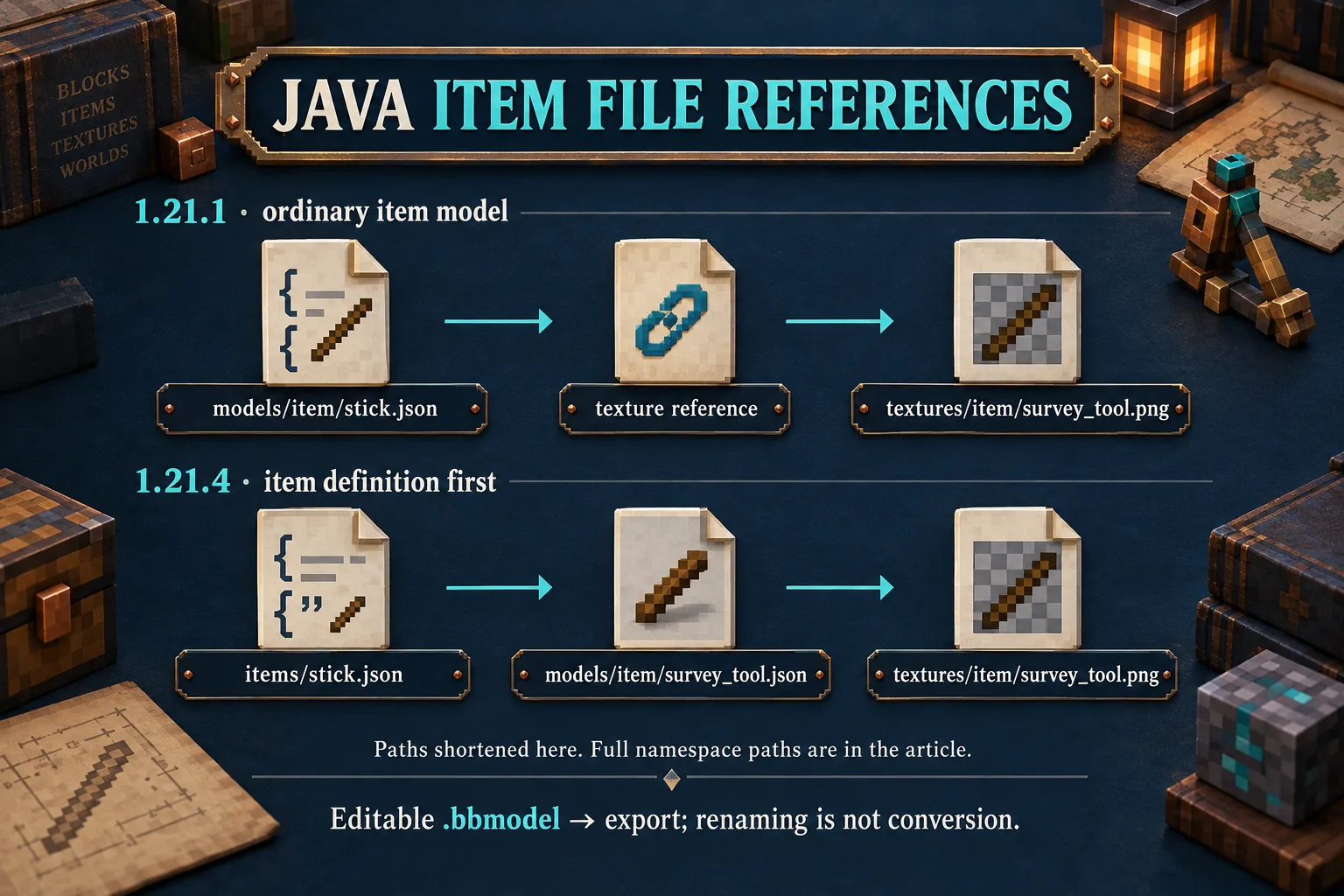
Follow one example all the way through
For an illustrative 1.21.4 replacement of the ordinary stick's appearance, assets/minecraft/items/stick.json can point to your own model:
{
  "model": {
    "type": "minecraft:model",
    "model": "studio:item/survey_tool"
  }
}
That reference leads to assets/studio/models/item/survey_tool.json. A texture reference of studio:item/survey_tool in that model leads to assets/studio/textures/item/survey_tool.png. The same identifier text resolves under different folders because a model reference and a texture reference have different jobs.
For 1.21.1, begin the ordinary stick replacement at assets/minecraft/models/item/stick.json; do not copy the new items/stick.json layer into the older version and expect it to select the model. This example changes an existing item's appearance. It does not register another item or add a recipe.
Repair one link at a time
- Confirm that the exported format is Java Block/Item and that the files belong to the active pack.
- Follow every namespace, folder and filename exactly, including case. Check referenced parent models too.
- If the shape appears but surfaces are wrong, inspect texture references and UV mapping before rebuilding the geometry.
- Temporarily isolate the edited pack from other visual replacements, reload resources with F3 + T, and inspect the same item again. Change one link between checks.
Changing only pack metadata does not convert the model structure. Renaming a .bbmodel to .json does not perform an export either. Keep the source so you can correct the right asset rather than repeatedly replacing the whole pack.
Comments 0
Share what worked, ask for help or reply to another player.
Use your Modonix account to join the discussion and manage your comments.
Sign in to commentNo comments yet. Share what worked for you.